SEO Content Structure & Topic Clusters
Technical On-Page SEO in 2026: Headings, Meta Tags and Alt Text

On-page work in 2026 comes down to a few elements that still change outcomes: one H1, a heading hierarchy that mirrors the argument, a meta title written for the click, a description that sets expectations, alt text that describes the image, and basic structured data. The value comes from applying the same standard to every post, not from optimising one page well and forgetting the next forty.
Most people running a company blog already know they should “do SEO on the page”. What they rarely know is which elements still carry weight and which ones are leftovers from a decade of outdated advice. Keyword density targets, exact-match H2s, alt text stuffed with search terms: all of that has been quietly obsolete for years, and some of it now actively hurts.
What remains is smaller and more boring. Google SEO at the level of a single article is mostly about making the page legible: to a reader scanning in five seconds, to a crawler building an outline, and to an AI system deciding which paragraph to quote. Those three audiences want nearly the same thing, which is why the work is worth doing once and doing properly.
This guide covers the mechanics of a single post: heading hierarchy, meta title and description, alt text, and where structured data fits. How those posts connect to each other — the cluster logic, the internal links, the decision of which page owns which theme — is a separate question, handled in the guide on how a blog is structured into topic clusters and pillar pages. Read this one as the quality bar each individual article has to clear before it goes live.
Contents
- What Still Matters On-Page in 2026
- Build a Heading Hierarchy a Machine Can Read
- Write Meta Titles and Descriptions That Earn the Click
- Handle Alt Text and Structured Data Without Overthinking
- The On-Page Standard Every Post Should Meet Before Publishing
- Frequently asked questions
- What This Actually Buys You
What Still Matters On-Page in 2026
The honest answer: fewer things than most checklists suggest, and they matter for a different reason than they used to.
Search results are no longer a list of ten links. A query can return an AI-generated summary, a set of cited sources, a people-also-ask block, and only then the classic results. Assistants that answer in prose need to find a specific passage, understand what it claims, and attribute it. That changes what on-page work is for. You are no longer optimising a page to rank; you are making a page easy to extract from.
Concretely, three things carry the weight. Structure — headings that create a real outline, so a machine can tell what each section answers. Surfaces — the title and description that appear in a result and decide whether anyone clicks. And machine-readable context — alt text, structured data, clean metadata that tell systems what the page contains without requiring them to guess.
Everything else on the traditional checklist is either automatic in a modern WordPress setup or irrelevant. Keyword frequency is not a target. Meta keywords have been dead for so long that mentioning them is archaeology. What you control, and what actually varies between a good post and a bad one, is the four areas below.
The prerequisites before you touch a single tag
Two things need to be in place first, or on-page work is polish on a bad foundation.
The first is knowing what question the article answers. An article with no clear query behind it cannot have a good title, because there is nothing to promise. If you are unsure where those questions come from, start with keyword research for a small business — the point is to write down, in plain language, the sentence a person would type.
The second is cadence. On-page quality compounds only if you keep publishing. A blog that wants to own a topic publishes at least three articles a week, up to one a day on the widest topics — one a week, or a count measured in articles per month, is a beginner’s pace, not a benchmark. A perfectly optimised post on a blog that has been silent for four months will not save it; search engines and AI systems read a stalled archive as neglect, which is the mechanism described in the piece on what search engines do when a blog goes quiet.
Get both in place, then treat the rest of this guide as the per-article standard.
Build a Heading Hierarchy a Machine Can Read
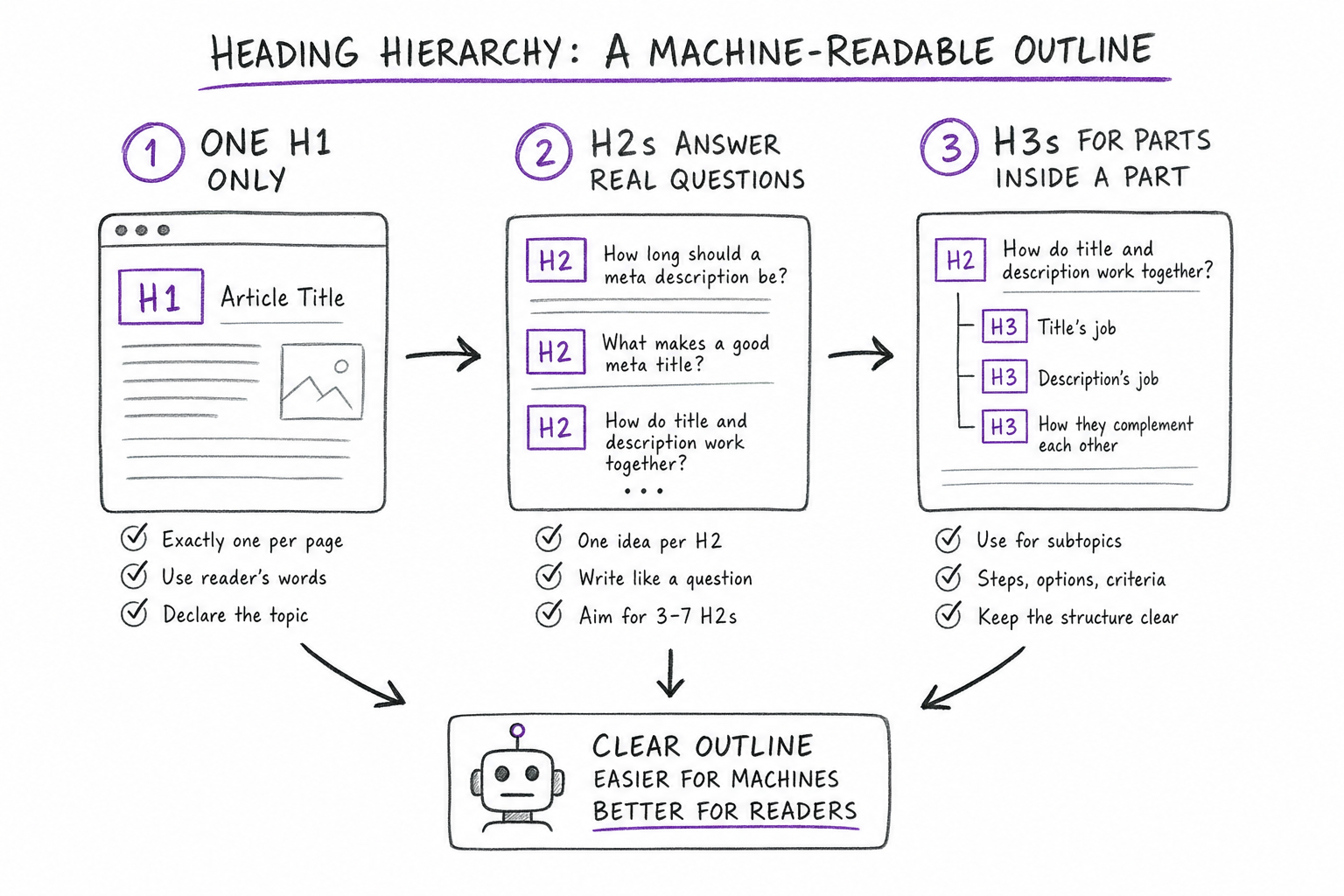
Headings are the cheapest structural improvement available and the most commonly broken. A heading is not formatting. It is a declaration that a new section of the argument starts here, and it has a level that says how that section relates to the ones above it.
Step one: one H1, and only one
Set exactly one H1 per page, and make it the article title. In WordPress the post title usually renders as the H1 automatically, which means the most frequent mistake is adding a second one inside the body because someone wanted bigger text. Two H1s produce an outline with two roots, and a machine building a summary has to pick one. Do not make it guess.
The H1 should contain the topic in the words a reader would use. It does not need to be identical to the meta title — in fact it usually should not be, because the two do different jobs, which the next section covers.
Step two: H2s that answer real questions
Each H2 opens one distinct idea. Write it as something a person would actually search or ask, not as a label. “Overview”, “Key concepts” and “Introduction” tell a crawler nothing and tell a scanning reader less. “How long should a meta description be” tells both exactly what the section delivers.
Keep the count controlled. Three to seven H2s in a standard article is a workable range; beyond that the outline stops being an outline and becomes a list. If you have more ideas than that, merge the related ones or push detail down a level.
Step three: H3s for the parts inside a part
Use H3 when an H2 contains steps, options, or criteria that deserve their own anchor — as this section does. Do not skip levels: an H2 followed by an H4 creates a gap in the outline, and assistive technology reads that gap as a missing section. Do not use an H3 to make a short paragraph look important.
The practical test is simple. Read only the headings, top to bottom. If that sequence alone explains what the article argues, the hierarchy works. If it reads like disconnected fragments, the problem is the structure, not the prose.
Takeaway: headings are the skeleton a summariser uses to decide which paragraph answers a question. A clean outline is what gets a specific section quoted rather than the page ignored.
Write Meta Titles and Descriptions That Earn the Click
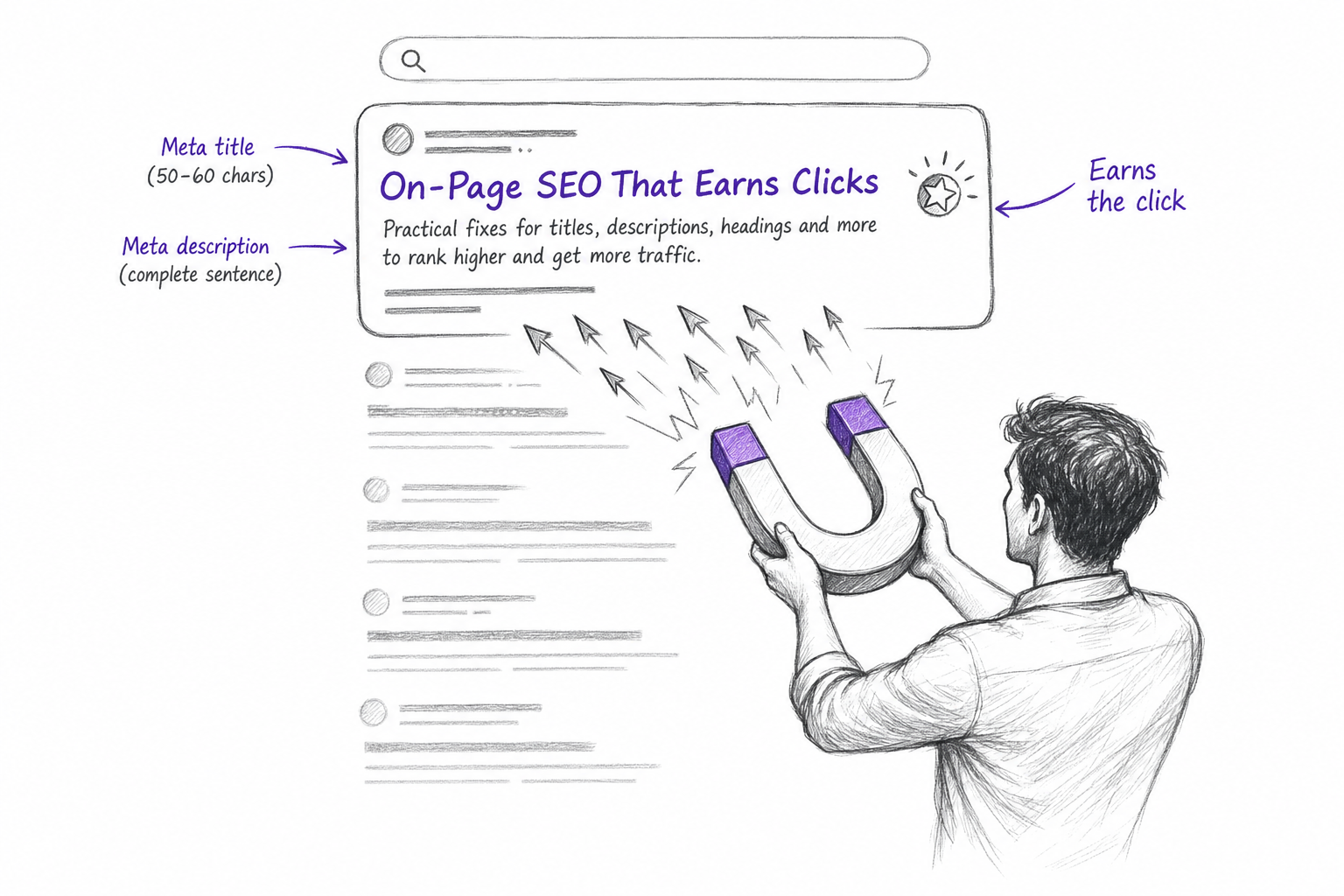
A meta title is the clickable headline in a search result. A meta description is the two-line summary below it. Neither is the page title, and treating all three as one field is the most common on-page waste.
The meta title: short, front-loaded, different from the H1
Aim for roughly 50 to 60 characters. Longer gets truncated on most result layouts, and a truncated title loses the part you cared about. Put the main term in the first two or three words, because that is where the eye lands and where a scan stops.
Then make it different from the H1. The H1 can be descriptive and slightly longer, because the reader who sees it has already arrived. The meta title is competing against nine other blue lines and has to say what the reader will get. An H1 like “Technical on-page SEO in 2026: headings, meta tags and alt text” pairs naturally with a shorter, blunter meta title that promises the outcome rather than describing the contents.
Avoid the two failure modes. Stuffing — repeating the keyword twice, or bolting the brand name onto every title — costs characters and buys nothing. And all-caps, which reads as spam to a human before an algorithm has an opinion.
The meta description: a complete sentence, written for a decision
Descriptions are not a ranking factor in any direct sense, and they are frequently rewritten by the search engine anyway. They still matter, because when they are used they decide the click.
Write 130 to 155 characters, as a complete sentence that ends with a full stop. Include the main term, because matched words are highlighted in the result. Most importantly, describe what the reader will decide or do differently after reading, not what the article is about. “This article discusses on-page optimisation” is a topic summary; “how to set headings, meta titles and alt text so every post meets one standard” is a reason to click.
The failure mode here is the copy-paste intro. A description that is the first sentence of the article cut off mid-clause reads as broken, and it reads that way in the one place where every competitor is visible next to you.
Takeaway: the title wins the scan, the description wins the click. Write them as a pair, after the article exists, not as a field you fill in to make a plugin turn green.
Handle Alt Text and Structured Data Without Overthinking
These two are the parts most often either skipped or badly overdone.
Alt text: describe the image, in a sentence
Alt text is the text alternative for an image. Its first job is accessibility: it is what a screen reader announces in place of the picture, and what appears when the file fails to load. Its second job is context — it tells systems what the image shows.
Write it as a short, natural description of what is actually in the image. Eighty to a hundred and twenty characters is a comfortable range. Including the article’s main term is fine when it fits the description honestly; forcing it in is the classic mistake, and a string of keywords separated by commas is worse than an empty attribute. Skip “image of” and “photo of” at the start, since the technology already announces that it is an image. Purely decorative graphics can carry an empty alt attribute deliberately.
How much alt text influences rankings specifically is a narrower debate with its own answer. For the purposes of a publishing checklist, treat it as mandatory and move on: every image gets descriptive alt text, no exceptions, no stuffing.
Structured data: the minimum that pays
Structured data is machine-readable markup that states explicitly what a page is — an article, its author, its publication date, its headline — rather than leaving a parser to infer it from the layout. It does not change your content. It removes ambiguity about it.
For a blog, the baseline is article-level markup with accurate dates and a clear headline, plus breadcrumb markup so the page’s position in the site is explicit. Question-and-answer markup is the other high-value piece, and it has enough implementation detail to deserve its own treatment rather than a paragraph here.
The rule that matters more than any specific schema: markup must match what is visible on the page. Describing content that a reader cannot see is a violation, not a shortcut, and it is the kind of mistake that gets markup ignored site-wide.
Takeaway: alt text and basic markup are checklist items, not strategy. Their value is in being present on all of your posts rather than perfect on three of them.
The On-Page Standard Every Post Should Meet Before Publishing
The hard part of on-page work has never been knowing the rules. It is applying them to article forty-one with the same care as article one.
This is where most company blogs quietly fail. The first posts get a hand-written meta title, a reviewed heading structure, alt text on every image. By the second month someone is publishing in a hurry, the description field stays empty, the post title gets reused verbatim as the meta title, and the images arrive with filenames as alt text. Nothing breaks visibly. The archive just becomes inconsistent, and an inconsistent archive is harder for any system to read as an authority on anything.
The fix is to define the standard once, in writing, and check it before publishing rather than after. Here is the bar worth holding every post to.
| Element | The standard | Common failure |
|---|---|---|
| H1 | Exactly one, contains the topic | A second H1 inside the body |
| H2 / H3 | Real questions, no skipped levels | Generic labels like “Overview” |
| Meta title | 50–60 chars, keyword first, different from H1 | Copy of the H1, or stuffed |
| Meta description | 130–155 chars, complete sentence | Empty, or the intro truncated |
| Alt text | Describes the image, 80–120 chars | Keyword list, or missing |
| Structured data | Article, breadcrumb, accurate dates | Markup that contradicts the page |
| Consistency | Applied to every post, every week | Applied to the first five |
Read that table as a pre-publish gate. If a draft fails a row, it is not ready, and the cost of fixing it before publication is a fraction of the cost of auditing it back in six months later.
The same logic applies to anything that publishes on your behalf. If a tool drafts or posts content automatically, the question to ask is whether it sets these fields itself or hands you a body of text and leaves the metadata to you — a distinction covered in more depth in the guide on what to check in an auto-publishing setup.
Frequently asked questions
How many H2 headings should a blog post have?
Three to seven for a standard article of roughly two thousand words. Each H2 should open one distinct idea phrased as a question a reader would ask. If you exceed seven, merge related sections or move detail into H3 subsections. More headings than that stops being an outline and becomes a list, which weakens the structure rather than clarifying it.
Should the meta title be the same as the H1?
No. The H1 can be longer and descriptive, since the reader who sees it has already arrived on the page. The meta title has 50 to 60 characters to win a click against other results, so it should be shorter, front-load the main term, and state the outcome. Duplicating the two wastes the chance to do both jobs well.
Do meta descriptions still affect rankings in 2026?
Not directly, and search engines often rewrite them based on the query. They still matter because when your version is shown, it decides whether the click happens. Write a complete sentence of 130 to 155 characters that includes the main term and says what the reader will decide or do differently. An empty description leaves that choice entirely to an algorithm.
What should alt text say for a blog image?
Describe what the image actually shows, in a short natural sentence of roughly 80 to 120 characters. Include the article’s main term only if it fits honestly. Skip openings like “image of” — screen readers already announce that. Avoid comma-separated keyword lists, which are worse than leaving the attribute empty. Purely decorative graphics can carry an intentionally empty alt attribute.
Is structured data necessary for a company blog?
The baseline is worth having: article markup with an accurate headline and publication dates, plus breadcrumb markup so the page’s position in the site is explicit. It does not change your content, it removes ambiguity about it. The one hard rule is that markup must match what a reader can see on the page, otherwise it risks being ignored across the whole site.
Does on-page optimisation still work if I publish rarely?
Only marginally. On-page quality compounds through volume and consistency: a blog aiming to own a topic publishes at least three articles a week, up to one a day on the broadest themes. A well-optimised post on an archive that has been silent for months reads as neglect to both search engines and AI systems, and no amount of metadata compensates for that.
Can on-page SEO be handled automatically?
Yes, and for the elements covered here it should be. Heading hierarchy, meta title length, description completeness, alt text presence and article-level markup are all rule-based checks that a system applies more consistently than a person working under deadline. Keep human review for the argument and the accuracy of the content, where judgement genuinely matters.
What This Actually Buys You
The mechanics in this guide are not where competitive advantage lives — every serious publisher knows them. The advantage is in never skipping them, on any post, for years. A blog where all four hundred articles have a clean outline, a written meta title, a real description and described images is legible to search engines and to AI systems in a way that a blog with thirty polished posts and three hundred careless ones never becomes.
That consistency is exactly the part humans do worst and systems do best. RankGrove applies these on-page standards to every article it generates and publishes — heading hierarchy, meta title and description, alt text on every image, article-level structured data, and a plain-text plus machine-readable note that AI helped write it, as the AI Act requires. You can see how these standards are applied to every article and set the bar once instead of re-checking it every week.
This article was produced with the help of artificial intelligence and reviewed by our editorial team before publication.
Start today
A blog like this, on your site
This article was written and published by RankGrove, with the method you read about on the site. Try it free on your WordPress: the first article lands in your drafts within ten minutes.
Start free trial