Company Blog Strategy & Automation
WordPress Auto-Publishing for SEO: What to Look For

An auto-publishing tool is worth buying only if what lands in WordPress arrives already structured: correct heading hierarchy, meta fields your SEO plugin recognises, internal links to the right pages, alt text, and valid structured data. This guide gives you the evaluation criteria to test before you connect anything to your production site, plus the red flags that tell you a tool will just dump disconnected posts into your blog.
You have already decided that publishing by hand every week is not sustainable. The question now is narrower and more technical: which tool can write into your WordPress install without breaking the structure that makes the blog rank in the first place?
That is a harder question than it looks, because almost every product in this space demos the same way. You watch an article appear in the editor, the title is there, the paragraphs are there, and it looks fine. The difference shows up three months later, when you have forty posts that no page links to, no structured data, duplicate categories, and a media library full of images with empty alt attributes. The publishing worked. The WordPress SEO did not.
This piece is about the mechanics of that connection. How the tool talks to WordPress, how it maps categories and tags, what it does with featured images, whether it publishes straight to live or through a draft gate, and what happens when something goes wrong. Why an abandoned blog costs you visibility is a separate topic, covered in the company blog strategy guide — here we assume you already agree and move on to the buying decision.
Read this as a checklist. Every section ends with something you can test during a trial, on a staging site, before you give any vendor write access to the blog that carries your organic traffic.
Contents
- How should an automation tool connect to WordPress?
- What has to arrive with the post, not after it?
- Does the tool understand your site structure, or just your post list?
- What safety controls do you need before granting write access?
- Which red flags should stop a purchase?
- What good looks like after ninety days
- Domande frequenti
- Conclusion
How should an automation tool connect to WordPress?
The connection method is the first thing to ask about, and it tells you more about the product’s maturity than the sample article does.
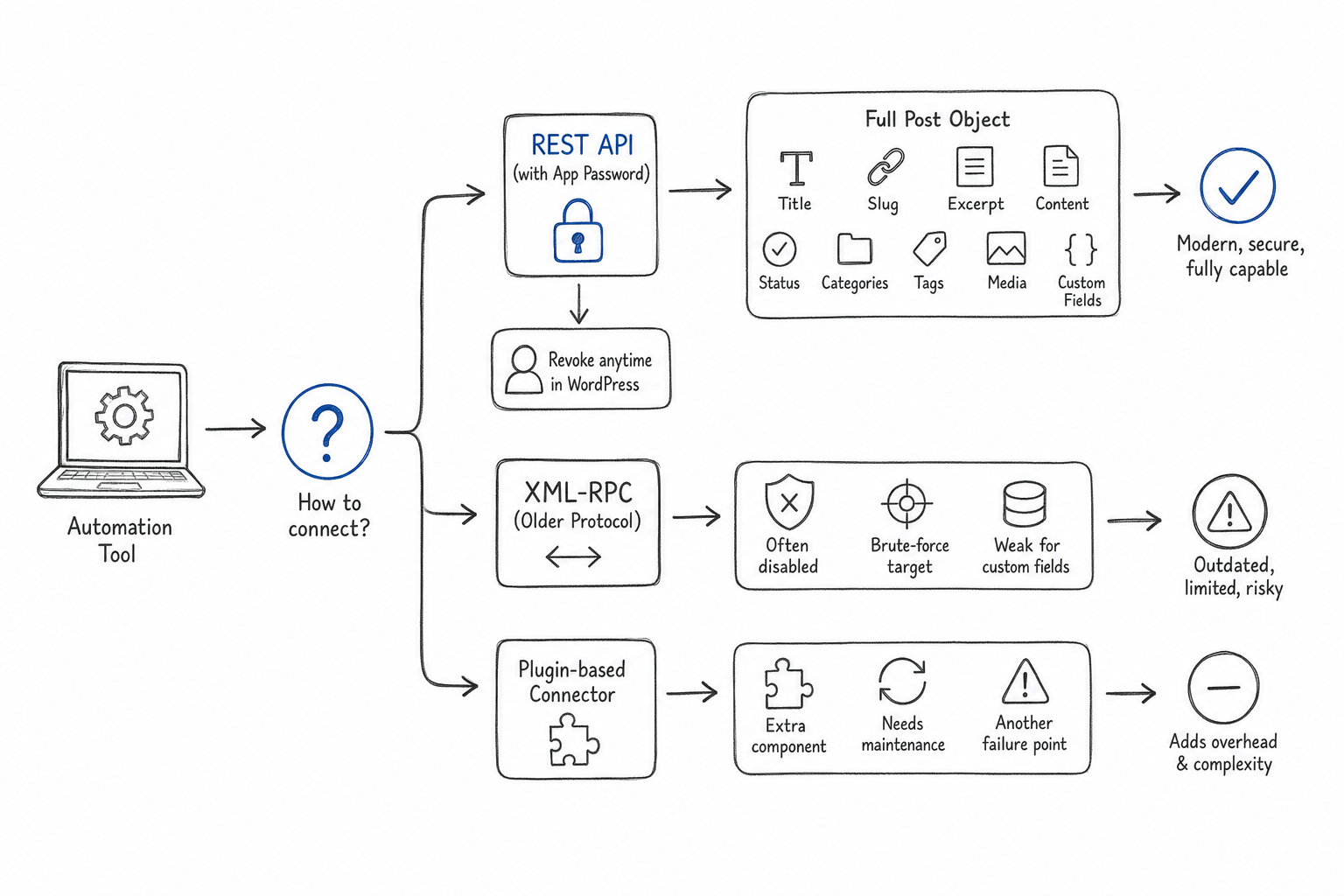
REST API with application passwords
The modern approach uses the WordPress REST API with an application password: a dedicated credential generated inside your user profile, revocable at any time, that never exposes your real login. It supports the full post object — title, slug, excerpt, content, status, categories, tags, featured media, and custom fields — in a single authenticated call.
This is what you want. Ask whether the integration uses application passwords and whether you can revoke access from WordPress alone, without asking the vendor to do anything. If revoking access requires an email to support, the integration is not under your control.
XML-RPC and why it is a warning sign
XML-RPC is the older publishing protocol. It still works on many installs, but a lot of hosting providers and security plugins disable it by default because it has been a common brute-force target. A tool that only supports XML-RPC is telling you its integration layer has not been touched in years.
There is also a functional limit: XML-RPC handles custom fields awkwardly, which is exactly where your SEO plugin stores meta titles and descriptions. If those fields do not arrive, someone fills them in manually for every post — and you are back to doing the work you were trying to remove.
Plugin-based connectors
Some tools ship a WordPress plugin instead. That can be fine, but it adds a component to maintain and a potential conflict surface with caching, security and SEO plugins. Ask how often the plugin is updated, which WordPress and PHP versions it supports, and what happens to your scheduled queue if the plugin is deactivated during a site update.
The practical test: connect the tool to a staging copy of your site, publish one post, then revoke the credential and confirm the tool loses access immediately. If any of those three steps needs vendor intervention, note it.
What has to arrive with the post, not after it?
A published article is a bundle of fields. The value of automation depends on how many of those fields arrive correct on the first write, because every field left empty becomes manual work multiplied by your publishing cadence.
Heading hierarchy and title fields
The post title should map to the H1 rendered by your theme, and the body should start at H2 with no skipped levels. Tools that put an H1 inside the content produce two H1s per page. It is a small technical error that a crawler reads as a confused document.
Check a published post’s source and confirm there is exactly one H1, that H2s follow it, and that H3s only appear nested under an H2.
Meta title and meta description in the right custom fields
Your SEO plugin stores the meta title and description in specific database keys. A tool that writes generic post fields but skips those keys leaves your search snippets to be auto-generated from the first paragraph.
Ask the vendor directly which SEO plugins they write meta fields for, and verify by opening the plugin’s editor panel after a test publish. If the fields are populated there, the integration is real. If they are empty and the vendor tells you the theme handles it, treat that as unresolved.
Slug, excerpt and canonical behaviour
The slug should be short, keyword-relevant and stable — because changing it later means a redirect. The excerpt matters for archive pages and for some social previews. Canonical tags should be left to your SEO plugin unless the tool has a specific reason to override them; a tool that writes its own canonical pointing anywhere other than your own URL is a hard stop.
Featured image and alt text
Featured images need to be uploaded to the media library, attached to the post, and given an alt attribute that describes the image in context. Automation that generates an image but leaves alt text empty creates an accessibility gap and throws away image search visibility on every single post.
Test it: publish one article, open the media library, and read the alt field. Empty means the vendor treats images as decoration.
Does the tool understand your site structure, or just your post list?
This is the criterion that separates a publishing pipe from an SEO system, and it is the hardest one to evaluate from a demo.
Category and tag mapping
WordPress taxonomies are easy to pollute. A tool that creates a new category for every article ends up producing dozens of thin archive pages, each with one post, all competing with each other. A tool that dumps everything into “Uncategorized” wastes the taxonomy entirely.
What you want is explicit mapping: you define the categories that exist, the tool assigns each article to one of them, and it creates nothing new without your approval. Ask what happens when the tool wants to use a term that does not exist yet — does it create it silently, skip it, or ask?
Internal linking logic
This is the single most important differentiator. Internal links tell search engines which of your pages matter and how your topics relate; they also carry readers toward the pages that actually sell.
Three questions expose whether a tool has real linking logic. First, does it link new articles to existing ones, or only to articles it published itself? Second, does it link upward to a main topic page and sideways to related articles, or does it scatter links at random? Third, can it link to your product and service pages, and do you control which ones?
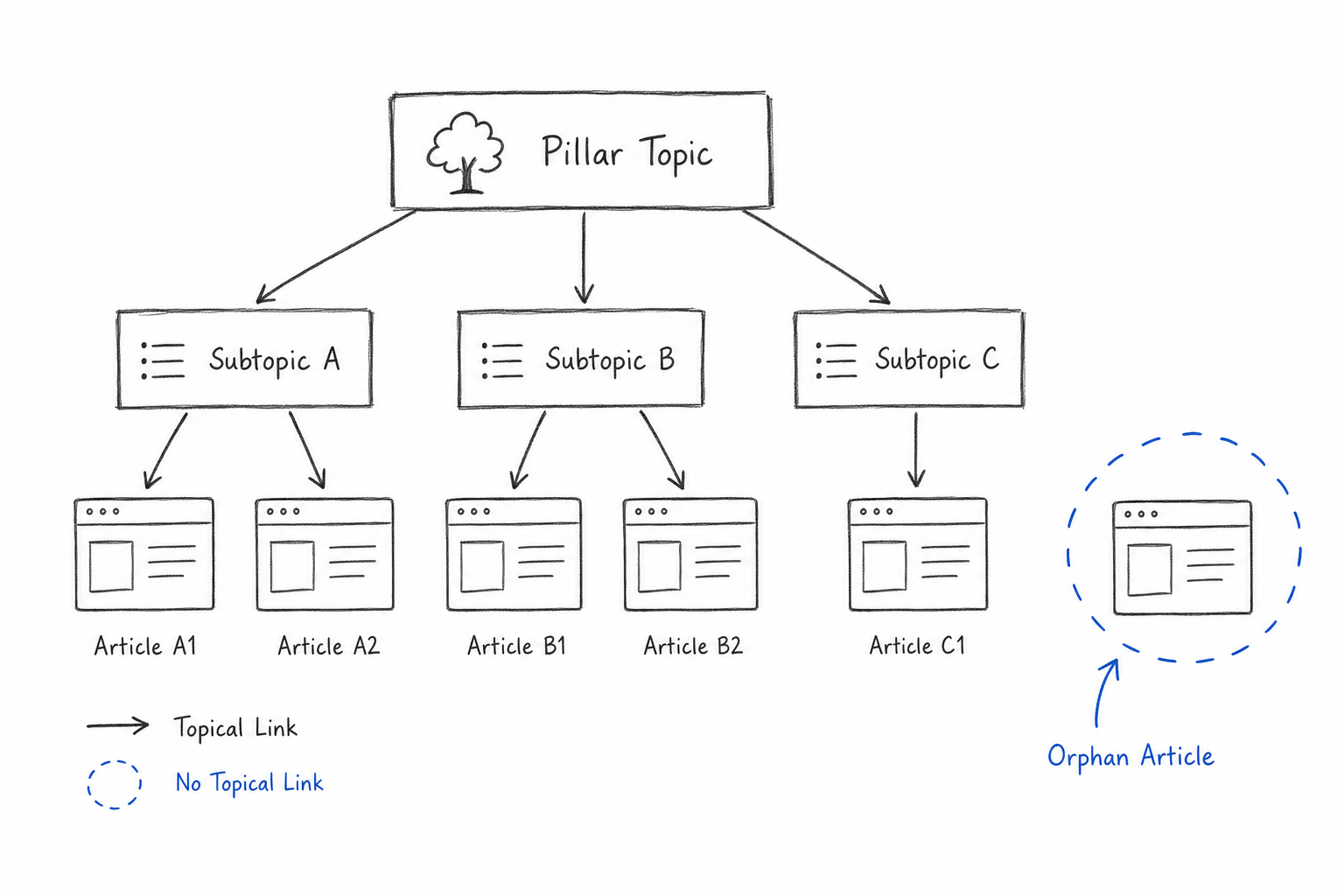
A tool with no internal linking model produces orphan posts: pages that exist, get crawled once, and never receive a single internal link. They contribute nothing to the rest of the site.
The structured way to solve this is a topic tree — one main article that owns a theme, several supporting articles answering specific questions around it, and links running in both directions plus outward to commercial pages. When the tool plans articles inside that structure, linking is a by-product of the plan rather than a post-processing guess.
Structured data and JSON-LD
Structured data is the machine-readable summary of your page. Article markup, breadcrumbs and FAQ markup all help search engines and AI answer systems understand what the page contains and who published it.
Ask whether the tool emits JSON-LD, which schema types, and whether it deduplicates against markup your SEO plugin already outputs. Two conflicting Article blocks on one page is worse than one clean block. Validate a test page with any structured data testing tool before you commit.
What safety controls do you need before granting write access?
You are handing an external system permission to publish on a domain that carries your brand. The controls below are not optional refinements.
Draft-first workflow and a human review gate
The default should be configurable. Some teams want articles to arrive as drafts, be reviewed, and be published by a person. Others are comfortable with scheduled publishing after an approval step earlier in the flow. What you should refuse is a tool with only one mode: straight to live, no gate.
A review gate matters for accuracy, for tone, and increasingly for compliance. If your organisation needs to demonstrate that AI-generated content was reviewed before publication, you need the approval to be recorded somewhere, not just performed.
Transparency and AI Act obligations
The European AI Act introduces transparency duties for AI-generated content, with the main obligations for general-purpose AI systems applying from August 2026. In practice that means published AI-generated material should be marked in a machine-readable way and the organisation should be able to show who approved what.
Ask the vendor a direct question: does the tool mark generated content machine-readably, and does it keep a record of approvals? If the answer is a general statement about responsible AI rather than a description of a mechanism, there is no mechanism.
Backup, rollback and scheduling control
Before the first connection, take a full backup of the database and the media library. Then check three things: can you pause the queue instantly, can you unpublish or revert a post from inside the tool, and does the tool respect a publishing schedule you set rather than firing whenever generation finishes.
Scheduling matters more than it seems. A fixed rhythm of at least three articles a week, up to one a day on broad topics, is easier to sustain and easier to plan around than bursts of ten posts followed by silence, and it gives you a predictable review workload.
Plugin conflicts to check on staging
Caching plugins can serve stale versions of newly published posts. Security plugins can block API requests or rate-limit them. Some SEO plugins overwrite meta fields on save. Redirect managers can interfere with slug changes. Run your first ten publications on staging with your full plugin stack active, not on a clean install.
Which red flags should stop a purchase?
Some weaknesses are fixable with configuration. The ones below are architectural, and they will not improve after you buy.
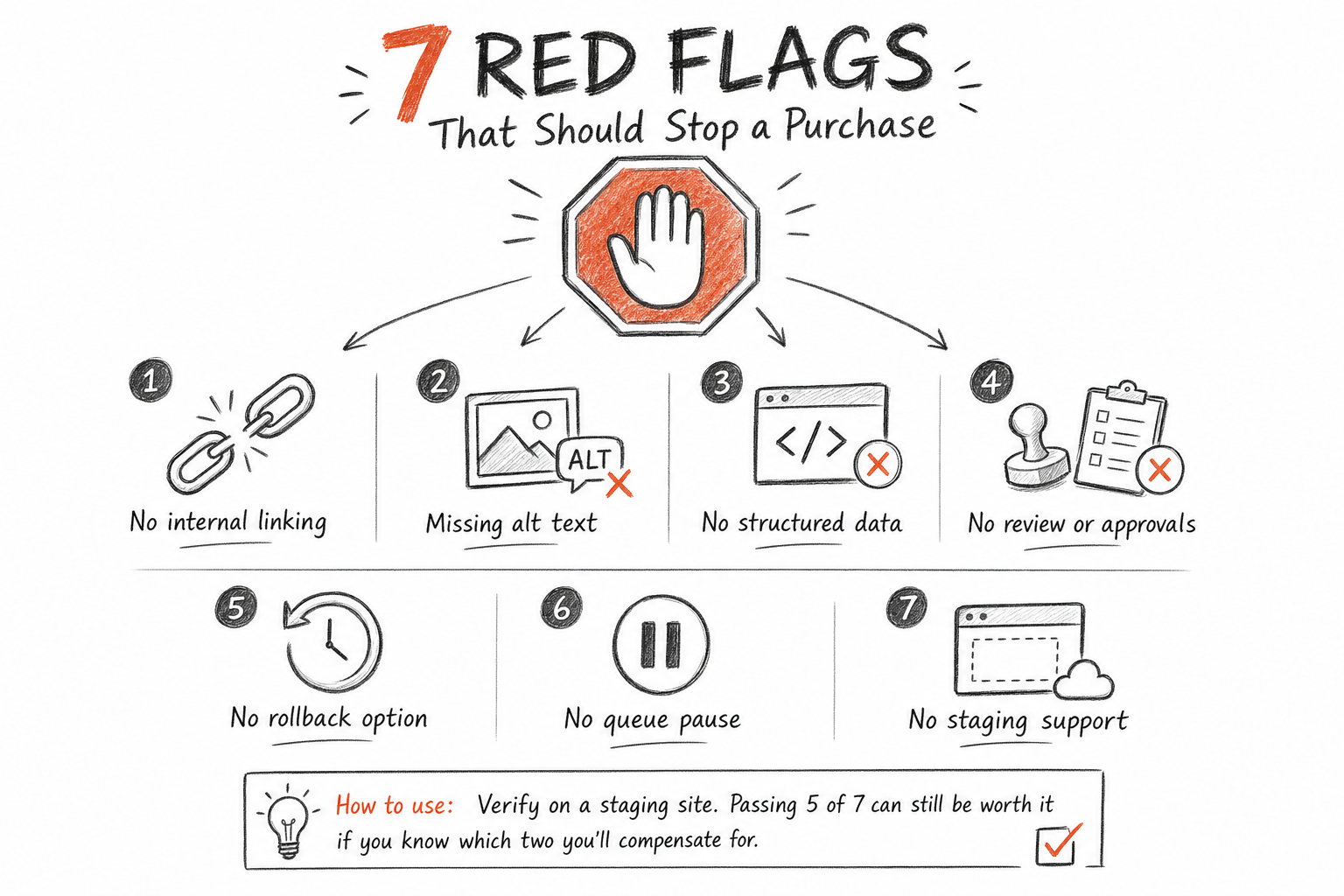
A tool that publishes articles with no internal linking logic gives you a pile of disconnected pages. A tool that generates or requires images but leaves alt text empty creates work on every post and loses image search entirely. A tool with no structured data output leaves search engines and AI systems to infer what your page is about. A tool with no human review gate and no record of approvals is a compliance problem waiting for an audit. And a tool that offers no rollback, no queue pause and no staging support is asking you to trust it with production on faith.
Here is the same evaluation condensed into something you can carry into a vendor call.
| Criterion | What to verify | Fails if |
|---|---|---|
| Connection | REST API, application password, self-revocable | XML-RPC only, or vendor-managed access |
| Meta fields | Meta title and description in your SEO plugin | Fields empty after test publish |
| Taxonomy | Mapping to existing categories you defined | New terms created silently |
| Internal links | Links to existing pages and commercial pages | Orphan posts, random anchors |
| Structured data | Valid JSON-LD, no duplicate blocks | No markup, or conflicting blocks |
| Images | Uploaded, attached, alt text written | Empty alt attributes |
| Governance | Draft gate, recorded approvals, AI marking | Publish-only mode, no audit trail |
Score each row on a staging site during the trial. A tool that passes five of seven can still be worth buying if you know which two you are compensating for manually; a tool that fails the linking and governance rows will cost you more in cleanup than it saves in writing.
What good looks like after ninety days
Run the same audit three months in. Every published article should sit in one of your defined categories, receive at least one internal link from another article, link outward to a main topic page and to at least one commercial page, carry a meta title and description you would have written, and render valid structured data. Your media library should have no empty alt attributes. Your approval log should show who signed off on what and when.
If that audit is clean, automation is doing what you bought it for: keeping the structure intact while removing the manual work. If it fails on linking or on governance, the tool is a text generator with a publish button, and the gap will widen with every post.
Domande frequenti
Is auto-publishing to WordPress bad for SEO?
Automated publishing itself is neutral. What matters is what gets published and how it is structured. Articles that arrive with correct heading hierarchy, populated meta fields, internal links to existing pages, alt text and valid structured data perform like any well-made content. Articles dumped without those elements underperform regardless of who or what wrote them.
Should I use the REST API or XML-RPC for automated publishing?
Use the REST API with an application password. It supports the full post object including custom fields, where SEO plugins store meta titles and descriptions, and the credential is revocable from your WordPress profile without vendor involvement. XML-RPC is often disabled by hosts and security plugins, and handles custom fields poorly.
How do I stop automated posts from becoming orphan pages?
Require the tool to link each new article to existing pages, not only to articles it created. The reliable pattern is a topic tree: a main article owning a theme, supporting articles answering specific questions, links running both directions, and outward links to commercial pages. Audit monthly for posts with zero incoming internal links.
Does the AI Act affect blog content generated by AI?
Yes. Transparency duties apply to AI-generated content, with the main obligations for general-purpose AI systems applying from August 2026. Practically, published material should be marked machine-readably and you should be able to show who reviewed and approved it. Ask vendors to describe the specific mechanism, not their general policy.
Should automated articles publish as drafts or go live directly?
Choose based on your risk tolerance, but insist the tool supports both. Draft-first suits regulated sectors and brands with strict tone requirements. Scheduled publishing after an earlier approval step suits teams with a steady cadence. A tool that only publishes straight to live removes your ability to catch errors before readers do.
Which WordPress plugins conflict with automated publishing?
Caching plugins can serve stale versions of new posts, security plugins can block or rate-limit API calls, some SEO plugins overwrite meta fields on save, and redirect managers can interfere with slug changes. Run your first publications on a staging site with your complete plugin stack active before connecting production.
How many articles per week should an automated blog publish?
At least three well-structured articles a week hold a niche, five or more pay off in broad, competitive sectors, and the widest topics reward one a day. A steady rhythm at that level keeps the site fresh, keeps the review workload predictable, and lets the topic tree grow coherently. Publishing ten pieces then going quiet for two months signals neglect and gives you no reliable data on what is working.
Conclusion
The technical mechanics decide whether automation compounds or accumulates. A tool that writes correct fields, maps taxonomies you control, links into an existing structure, emits clean markup and records approvals adds value with every post; one that skips those steps adds pages that nobody links to and nobody finds. Test the checklist on staging, score the seven rows honestly, and if you want to see how a structured publishing pipeline handles these steps end to end, see how the process works.
Start today
A blog like this, on your site
This article was written and published by RankGrove, with the method you read about on the site. Try it free on your WordPress: the first article lands in your drafts within ten minutes.
Start free trial